
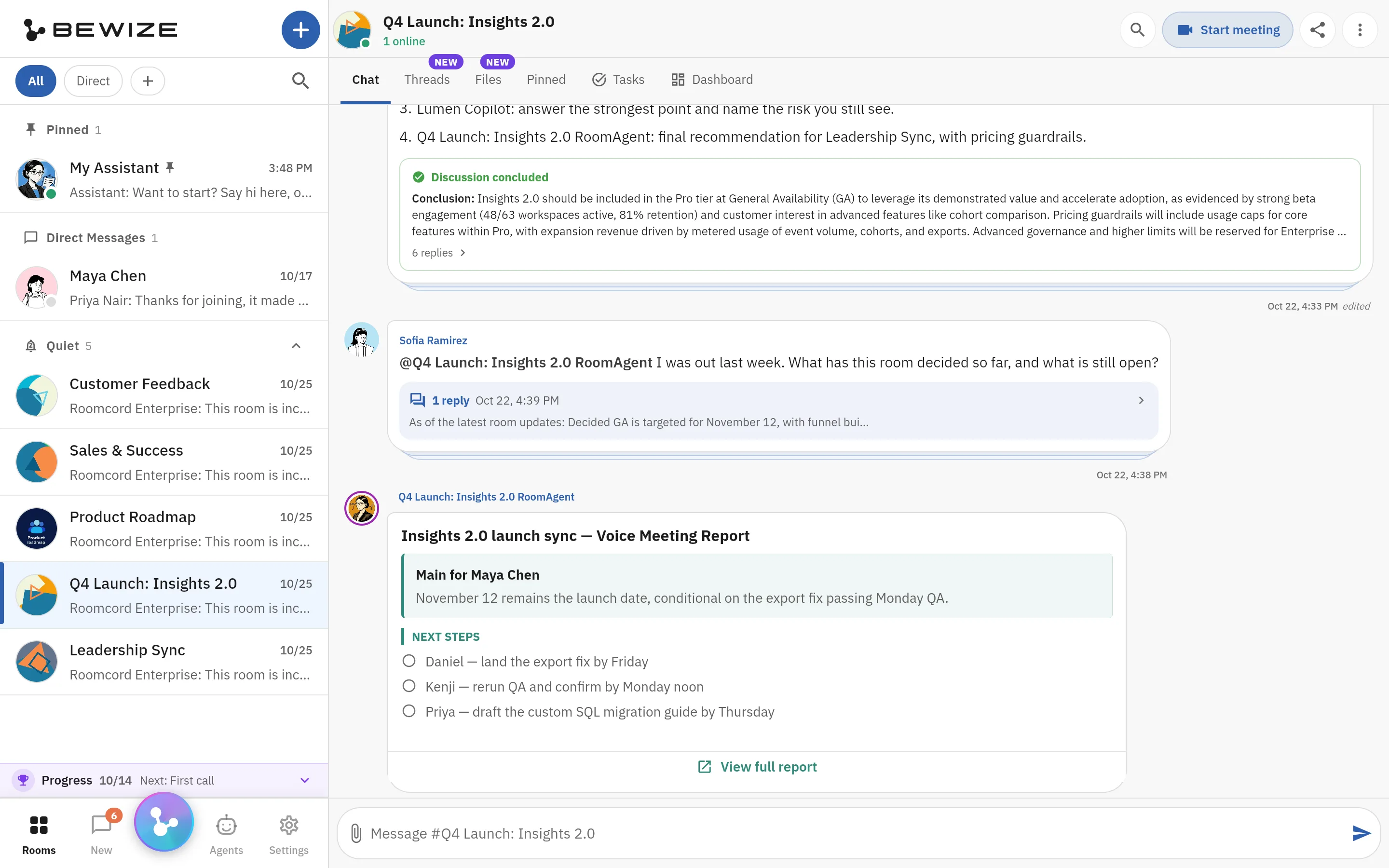
Ask the room agent, in front of the team
Sofia asks the room agent what the room decided, and the reply is a thread under her question. Below it, the room agent’s report of a recorded voice meeting lists a next step each for Daniel, Kenji and Priya.
Slack AI alternative
Look for a Slack AI alternative if your team hits the limit of 15 Slackbot messages per member per week on Business+, or wants its own agents in the team conversation. Stay with Slack AI if you run Salesforce, depend on Slack Connect, or only need thread summaries. Roomcord is a shared project room where people and AI teammates work from the same conversation, files and meetings. It runs next to Slack, not in place of it.
Look at Roomcord if:
Stay with Slack if:
What this page is: a dated comparison by Bewize, the maker of Roomcord. Slack prices and limits link to their sources. Roomcord claims follow a check of the production build on November 15, 2026. Its availability section lists what is in development. Reviewed November 15, 2026.
Slackbot became a personal agent for Business+ and Enterprise+ on January 13, 2026. On Business+, each member gets 15 messages per week. Slack’s CTO said in April 2026 that the limit needs a revisit. As of November 2026 the pricing page still shows 15.
On June 17, 2025, Business+ went from $12.50 to $15 per user per month on annual billing. The separate AI add-on is no longer sold on the website, and the same page says the price “won’t change if you turn all AI features off.” One Hacker News user called it “raising prices with no option to not buy it.”
Agentforce and third-party AI apps can be deployed on paid plans, but as a separate purchase. Extra Slackbot usage means Salesforce Flex Credits, a connected Salesforce org and approval from both admins.
Slack’s API terms changed on May 29, 2025. A law firm summary says they prohibit bulk export, persistent copies and indexes, and use of the data in large language models. Commercial apps outside the Slack Marketplace are limited to 1 history request per minute and 15 messages per request. Slack states that internal apps built by the customer are exempt.
In September 2025 the non-profit Hack Club reported a bill increase of $195,000 per year and feared for its message history. Slack’s CEO replied that the team corrected it and restored the non-profit price. Other teams still checked their exit path. One commenter’s team would “ensure we can exfiltrate our data and jump platforms.”
Slack AI pricing, per user per month, as of November 2026. Sources: Slack’s pricing page, plan features and Slackbot limits.
| Plan | List price | AI included | Limit or meter |
|---|---|---|---|
| Pro | $7.25 annual, $8.75 monthly | Conversation and thread summaries, huddle notes | Slackbot trial allowance that does not reset |
| Business+ | $15 annual, $18 monthly | Adds Slackbot, AI search, recaps, translations, file summaries, AI workflow generation | 15 Slackbot messages per member per week, 15 automatic task runs per day |
| Enterprise+ | $45 annual, sold through sales | Adds enterprise search | No weekly or lifetime Slackbot message limit |
| Agentforce, third-party AI apps | Separate purchase | Can be deployed on paid plans | Extra Slackbot usage: Salesforce Flex Credits |
A 25-person team on Business+ annual pays 25 seats at $15: $375 per month, $4,500 per year at list price. Before June 2025 it was $3,750. The $750 difference applies with AI on or off. Enterprise+, with no weekly limit, lists at three times the Business+ price. We print no Flex Credit price, because we could not confirm one.
Roomcord has no public price list and no self-serve signup. Pricing is by quote, after a demo on your own workflow. Ask for the included usage and the overage terms in writing.
| Question | Slack AI | Roomcord |
|---|---|---|
| Where do agents work? | Slackbot is a personal agent in Slack on Business+ and Enterprise+. Agentforce and partner AI apps are a separate purchase on paid plans. | Agents are participants in a project room, including A2A-compatible agents that you bring. Mention one in a thread and it answers there, where the room sees it. |
| What does the AI know? | Your Slack conversations. AI search and recaps start at Business+. Enterprise search across other systems needs Enterprise+. | The room: conversation, files, meeting recaps and a Room Context document. Nothing from Slack. |
| What happens after a meeting? | Huddle notes on paid plans. | Meeting Mode records on mobile or web, up to two hours. Roomcord transcribes the recording, and a recap is posted in the room. The recap proposes names and dates from the conversation, and a person confirms them. Automatic tracking, reminders and chasing are in development. |
| What are the limits or meters? | 15 Slackbot messages per member per week on Business+, no weekly limit on Enterprise+. More through Salesforce Flex Credits. | No public meter or price. Usage terms are in the quote. We do not claim unlimited usage. |
| Where does it run? Who controls the data? | Slack’s cloud. Data residency in 12 regions outside the US on Business+ and Enterprise plans. | Designed for private cloud or data-center infrastructure that the company controls. Placement is agreed per deployment. No compliance certificate is claimed here. |
| What does it not do? | Lower the price when AI is off. Include Agentforce in the plan. | Replace Slack Connect, the app marketplace or Salesforce channels. Connect to Slack today. Send reminders or chase owners automatically today. |
The job: a team agrees in a thread to move a launch by one week. Two weeks later, nobody knows who owns the new date.
In Slack. The decision sits in a thread in a busy channel. Paid plans can summarize the thread. On Business+, AI search and recaps help someone find it later, and each question to Slackbot counts against that member’s 15 per week.
A summary reports what people wrote. Naming one owner and one date for the team is still a person’s job, or a job for an agent that you buy separately.
In Roomcord today. The discussion happens in the launch room. A teammate mentions an agent in the thread and asks what was decided and who was named. The agent answers there, from the room’s conversation, files and meeting recaps. The room sees the answer and can correct it.
What is manual: the answer can propose a name and a date from the conversation, and a person confirms them and pins them. Automatic tracking, reminders and chasing are in development. The thread must be in Roomcord: the room cannot see a decision that stays in Slack.
Real screens, staging build, demo data
Captures from the Roomcord staging build, taken on November 15, 2026, with demo data: rooms of a fictional company called Lumen, and a Vendor Renewals room with fictional vendors. Half-width images are crops. A code check on the same day found the same features in the production build. A caption says plainly when something shown is still in development.
Sofia asks the room agent what the room decided, and the reply is a thread under her question. Below it, the room agent’s report of a recorded voice meeting lists a next step each for Daniel, Kenji and Priya.
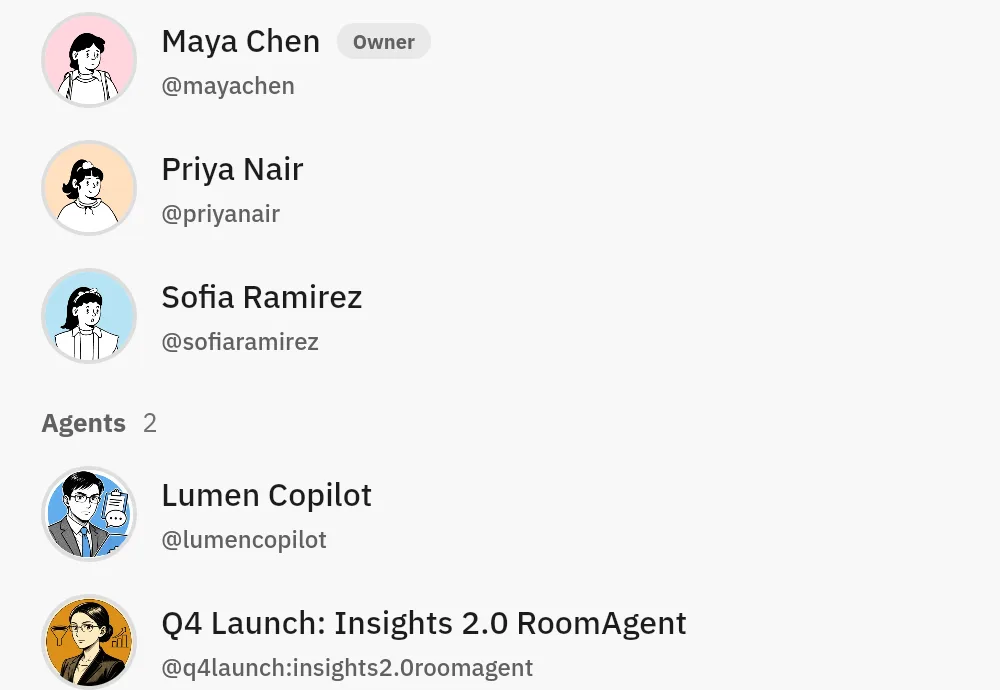
Part of the Members screen of one room: people first, then two agents by name, Lumen Copilot and the room agent.
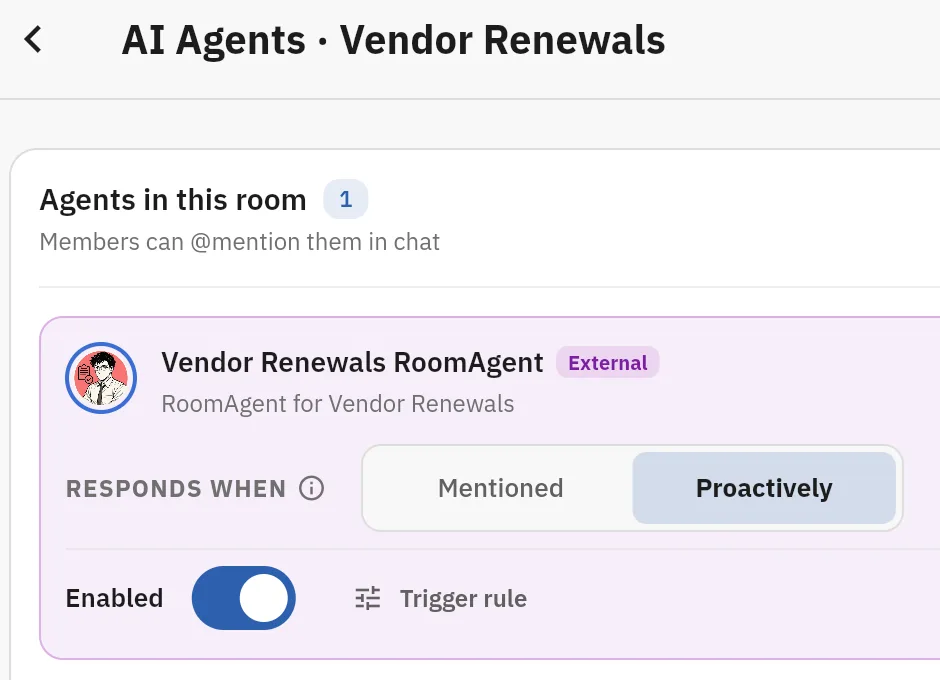
Part of the AI Agents screen of the Vendor Renewals room. The room agent has an Enabled switch and answers when Mentioned or Proactively.
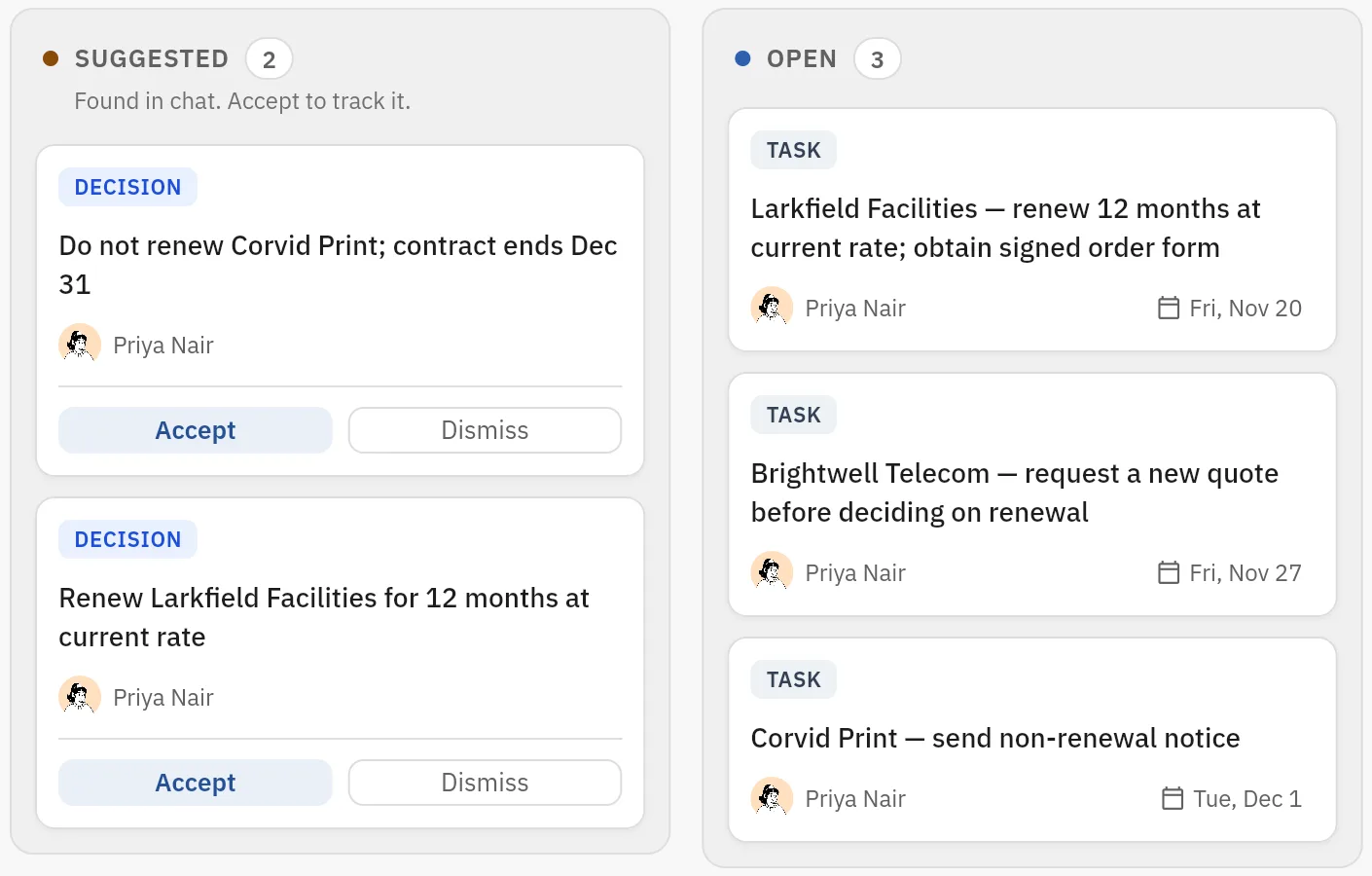
Part of a room’s Board. Two decisions found in chat wait for Accept or Dismiss. Three open tasks show an owner and a due date. Suggested cards are tracked only after a person accepts them. Automatic reminders and follow-up are in development.
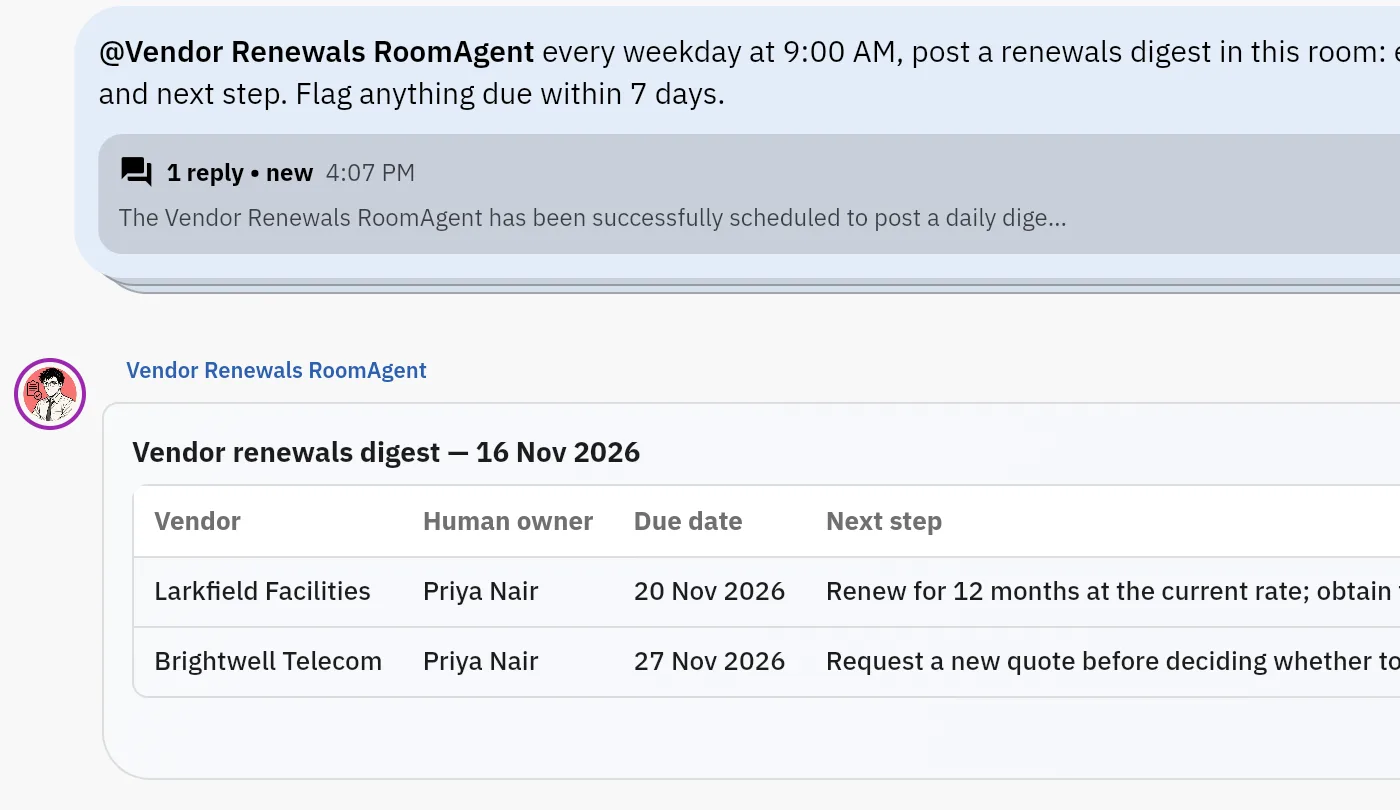
Priya asks the room agent for a renewals digest every weekday at 9:00 AM. The reply says it is scheduled, and a digest table follows: vendor, owner, due date and next step. The digest shown was started with Run now, not by the timer.
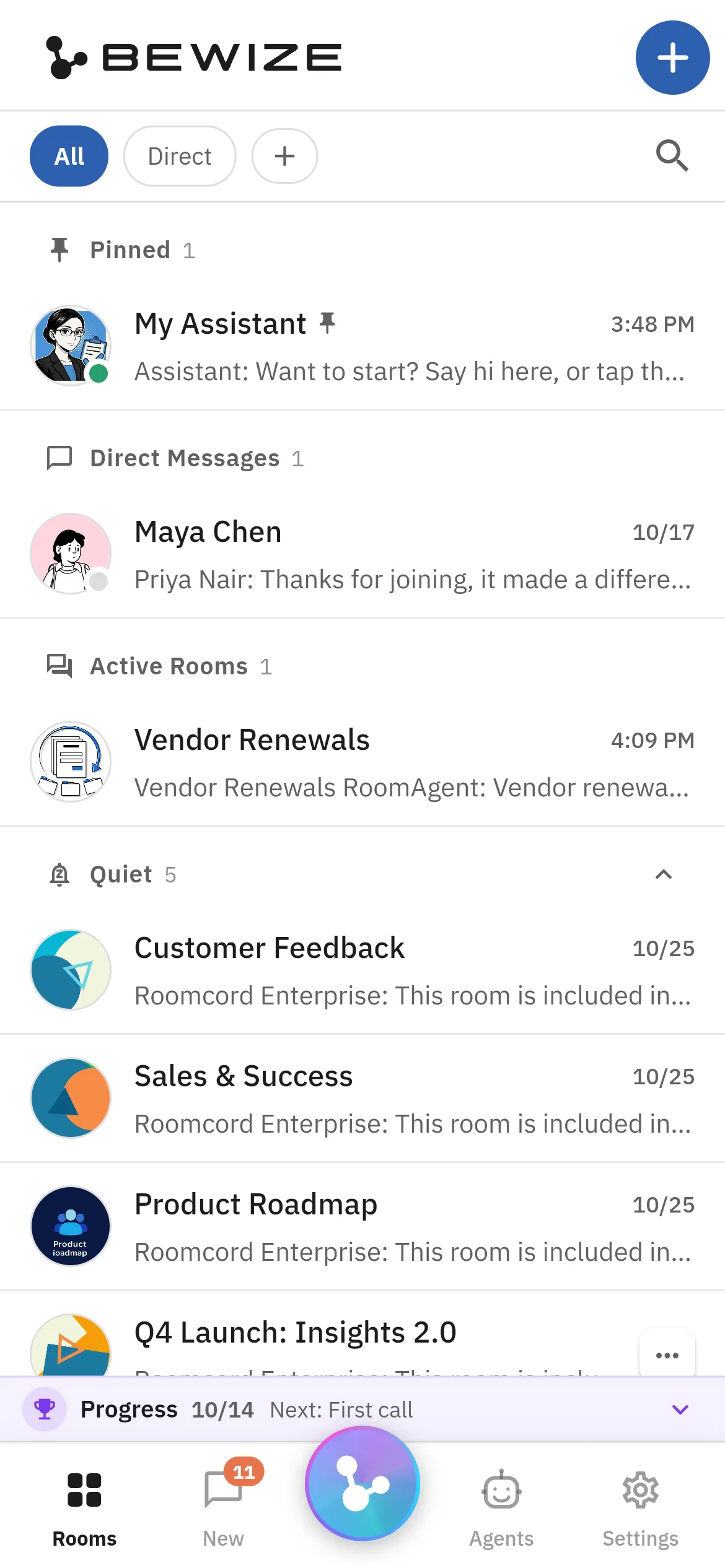
The web app at phone size: the pinned assistant, a direct message, the active room and the quiet rooms in one list.
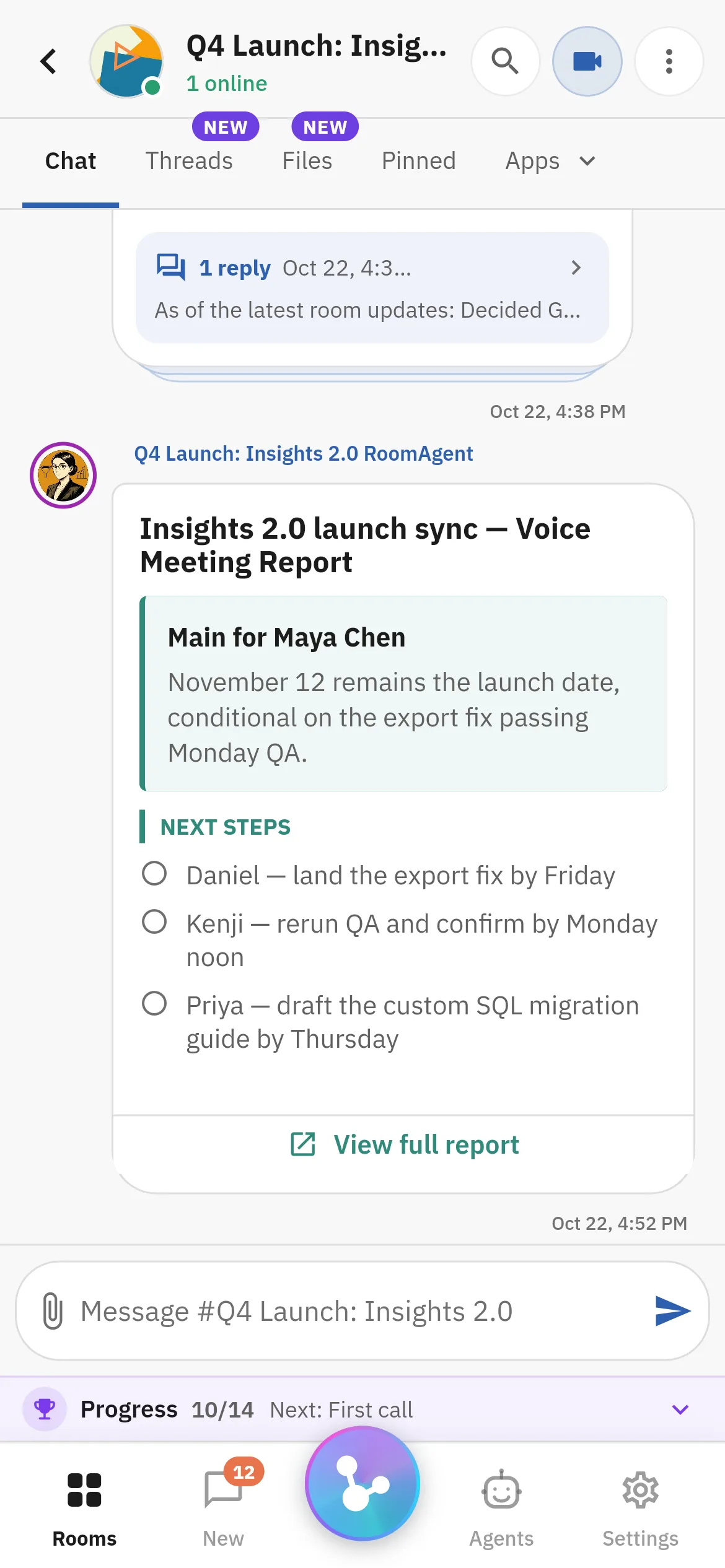
The room agent’s meeting report on a phone: the main point, three named next steps and a link to the full report.
The cost: a second app for that workflow. The test is a pilot agreed with us after a demo. Roomcord has no self-serve signup.
Pick the weekly review, approval or handoff that loses its decisions in Slack threads. We show it in a Roomcord room: what works today, what stays manual, what is in development. Pilot scope and price follow.
Share a little context. Our team will reply by email to arrange the next step.