
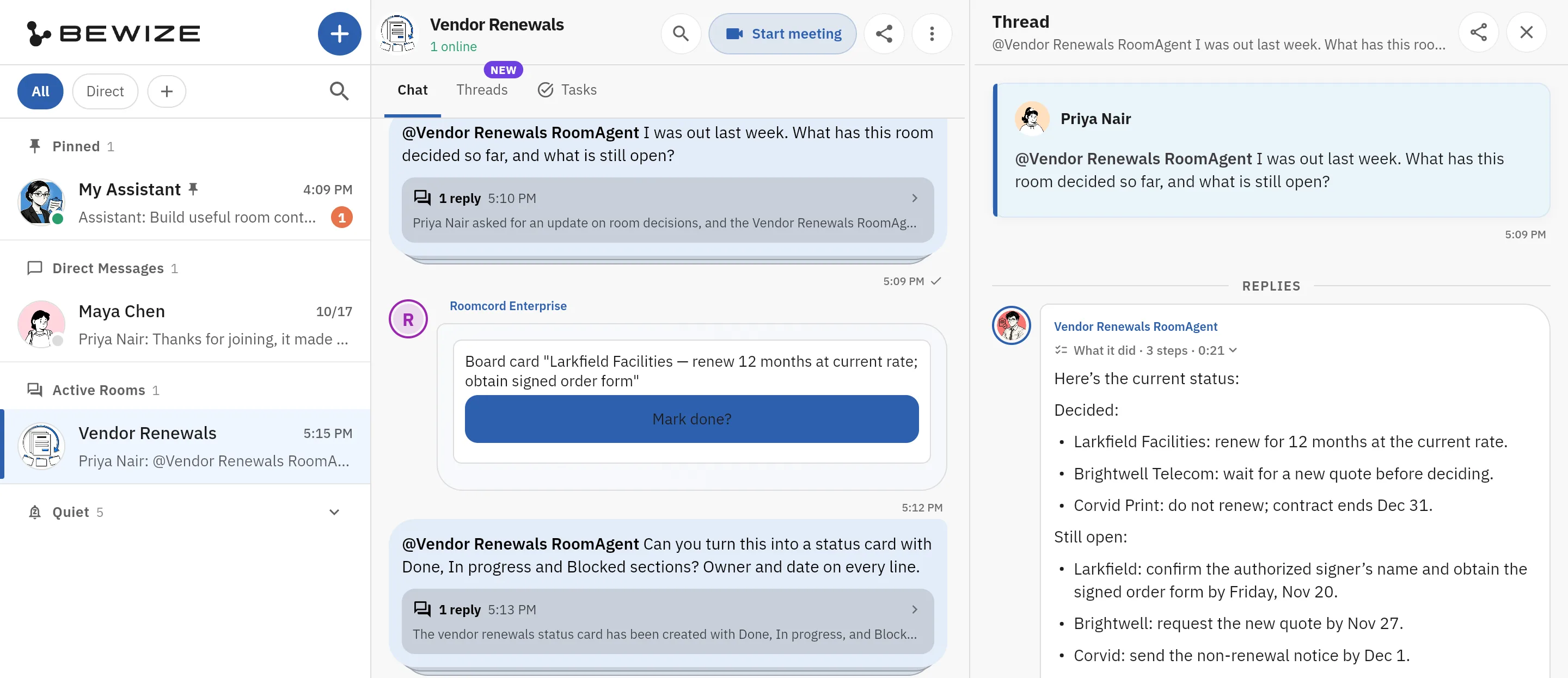
Ask the room what it decided
Priya writes: “I was out last week. What has this room decided so far, and what is still open?” The room agent answers in the thread with two lists, Decided and Still open, for three vendors.
Notion AI alternative
Look for a Notion AI alternative if you pay $20 per member for AI but your team decides in chat and calls. Stay with Notion AI if your knowledge lives in docs and databases and 1,500 credits per member cover your use. Roomcord is a shared project room where people and AI teammates work from the same conversation, files and meetings. It does not replace Notion's docs and databases.
Look at Roomcord if:
Stay with Notion AI if:
What this page is: a dated comparison by Bewize, the maker of Roomcord. Notion prices and limits link to their sources. Roomcord claims follow a check of the production build on November 15, 2026. Its availability section lists what is in development. Reviewed November 15, 2026.
As of November 2026, Business and Enterprise members get 1,500 Standard and 500 Select credits a month. Notion says the balances “can’t be pooled across the workspace”, and unused credits do not roll over. At zero, the features that use them pause until the monthly reset, unless an owner turns on paid Notion credits (off by default).
Notion states that AI Meeting Notes “will begin consuming monthly Standard credit allowance on December 1, 2026”. Its estimate is about 10 Standard credits for a one-hour meeting, from the same balance as chat and writing.
On Notion’s pricing page, Free and Plus list a “Limited Trial” of Notion Agent and meeting notes. Business, at $20 per member per month, is the first plan that includes them. Guides that quote a $10 AI add-on are out of date.
Custom Agents are “Free to try, then $10 per 1,000 monthly Notion credits”. An agent you set up yourself uses your 500 Select credits first. Workspace-funded agents, and agents run through the API or a connected app, use paid Notion credits.
Notion’s security advisory, as read on November 15, 2026, says an incident at Fireworks AI affects under 1% of Notion workspaces and involved Notion AI chat transcripts from the Insights feature. Notion states this “was not a breach of our systems”. It has disabled Insights, and the investigation is open.
Roomcord’s default agents use OpenAI models, so ask us the same question: which providers see your prompts?
Notion AI pricing as of November 2026, from Notion’s pricing page and credit rules:
| Plan | List price per member, per month | AI included | Limit or meter |
|---|---|---|---|
| Free, Plus | $0 and $10 | Trial | Limited trial, no AI add-on listed |
| Business | $20 | Notion Agent, AI Meeting Notes, Enterprise Search (beta) | 1,500 Standard and 500 Select credits per member, per month |
| Enterprise | Custom | The same, plus zero data retention with LLM providers | Per-member credits |
| Custom Agents | $10 per 1,000 Notion credits | Free to try | About 5, 10 or 25 credits per simple, medium or complex task |
The pricing page adds “Save up to 20% with yearly”, and we could not confirm monthly-billing prices on it. Notion also says the included credits “may vary” by plan and purchase arrangement.
A 25-person team pays $6,000 a year for Business and $3,000 for Plus at these list prices. Each person holds a separate 1,500 Standard credits, about 150 medium tasks by Notion’s estimate, so one heavy user can hit zero while a colleague’s credits expire unused.
Roomcord has no public price list and no self-serve signup. Pricing is by quote, after a demo on your own workflow. Ask for the included usage and the overage terms in writing.
| Question | Notion AI | Roomcord |
|---|---|---|
| Where do agents work? | In the Notion workspace. Notion Agent creates and edits pages and databases. Custom Agents run on a trigger or a schedule. | In shared project rooms. Mention an agent in the conversation and it replies there, in front of the team. |
| What does the AI know? | Your Notion workspace, the web, and connected tools such as Slack and GitHub through Enterprise Search (beta). | The room: its conversation, files and meeting recaps, plus a Room Context document. |
| What happens after a meeting? | AI Meeting Notes transcribe and summarize the call with no bot. Notion Agent can update pages from the notes. | Meeting Mode records on mobile or web, up to two hours. Roomcord transcribes the recording, and a recap is posted in the room. The recap proposes names and dates, and a person confirms them. Automatic tracking, reminders and chasing are in development. |
| What are the limits or meters? | Published: 1,500 Standard and 500 Select credits per member, per month. No pooling, no rollover. | Not published. Usage terms are set in a quote. |
| Where does it run and who controls the data? | Notion’s cloud. The pricing table lists 30 day retention with LLM providers below Enterprise, zero on Enterprise. | Designed for private cloud or data-center infrastructure that the company controls. Placement is agreed per deployment. No compliance certificate is claimed here. |
| What does it not do? | Full AI is not on Free or Plus. Credits cannot be shared or carried over. | It is not a document or database tool. We claim no native Notion integration. Automatic reminders, approval ballots and boss view are in development. |
Sources: Notion’s AI product page, pricing page and help center. Not an independent benchmark.
The job: the launch spec lives in a Notion page. On Tuesday the team agrees, in a call and a chat thread, to move the launch by two weeks.
In Notion. If someone captures the call with AI Meeting Notes, the transcript and summary land in a page. A Business member can ask Notion Agent to update the spec and the roadmap database from those notes.
The gap is the chat thread in another tool. The agent sees it only if that tool is connected through Enterprise Search, and somebody still has to ask.
In Roomcord today. The thread, the spec file and the call recap sit in one room. If someone records the meeting with Meeting Mode, a recap is posted there. A teammate mentions an agent and asks what changed. The answer comes from that room’s conversation and files, where the team can correct it.
What stays manual: the recap proposes names and dates from the conversation, and a person confirms the owner and the date. A person also updates the Notion page. Automatic tracking, reminders and chasing are in development.
Real screens, staging build, demo data
Captures from the Roomcord staging build, taken on November 15, 2026, with demo data: rooms of a fictional company called Lumen, and a Vendor Renewals room with fictional vendors. Half-width images are crops, and so is the first image. A code check on the same day found the same features in the production build. A caption says plainly when something shown is still in development.
Priya writes: “I was out last week. What has this room decided so far, and what is still open?” The room agent answers in the thread with two lists, Decided and Still open, for three vendors.
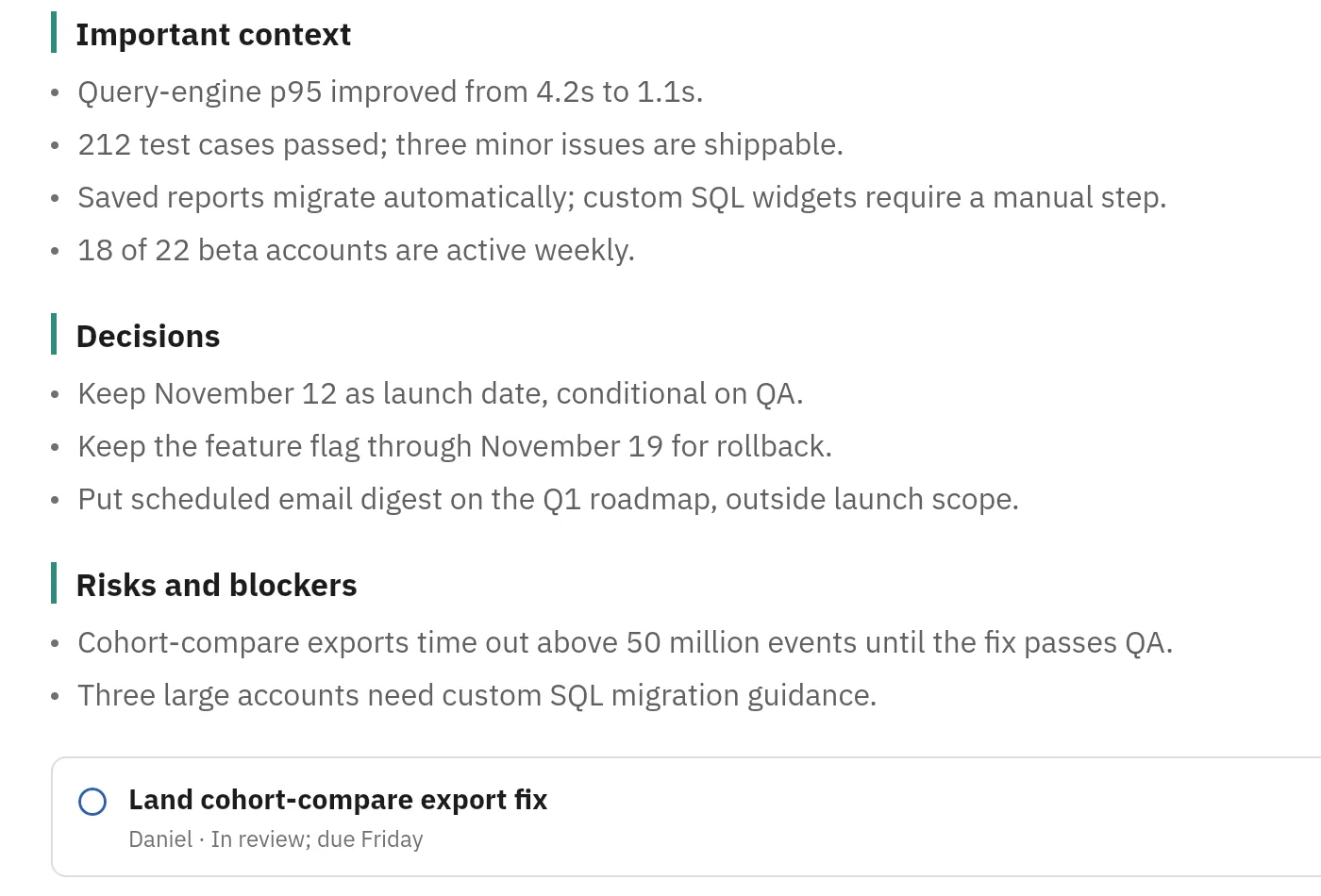
Part of the full meeting report: important context, three decisions, two risks and blockers, then the first action item with a name and a due day.
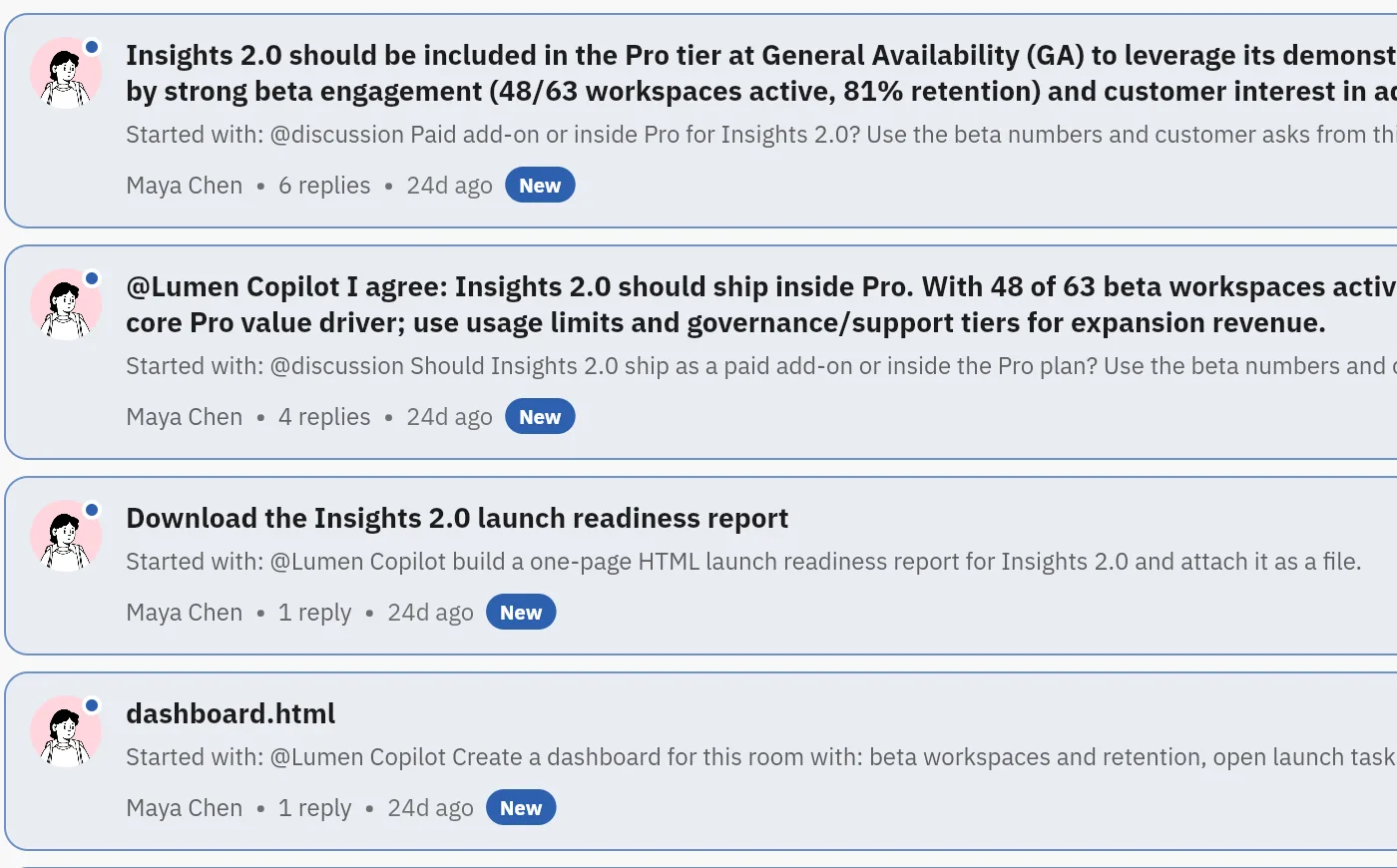
Part of the Threads tab: each thread has an AI summary as its headline, the message that started it, the author and the reply count.
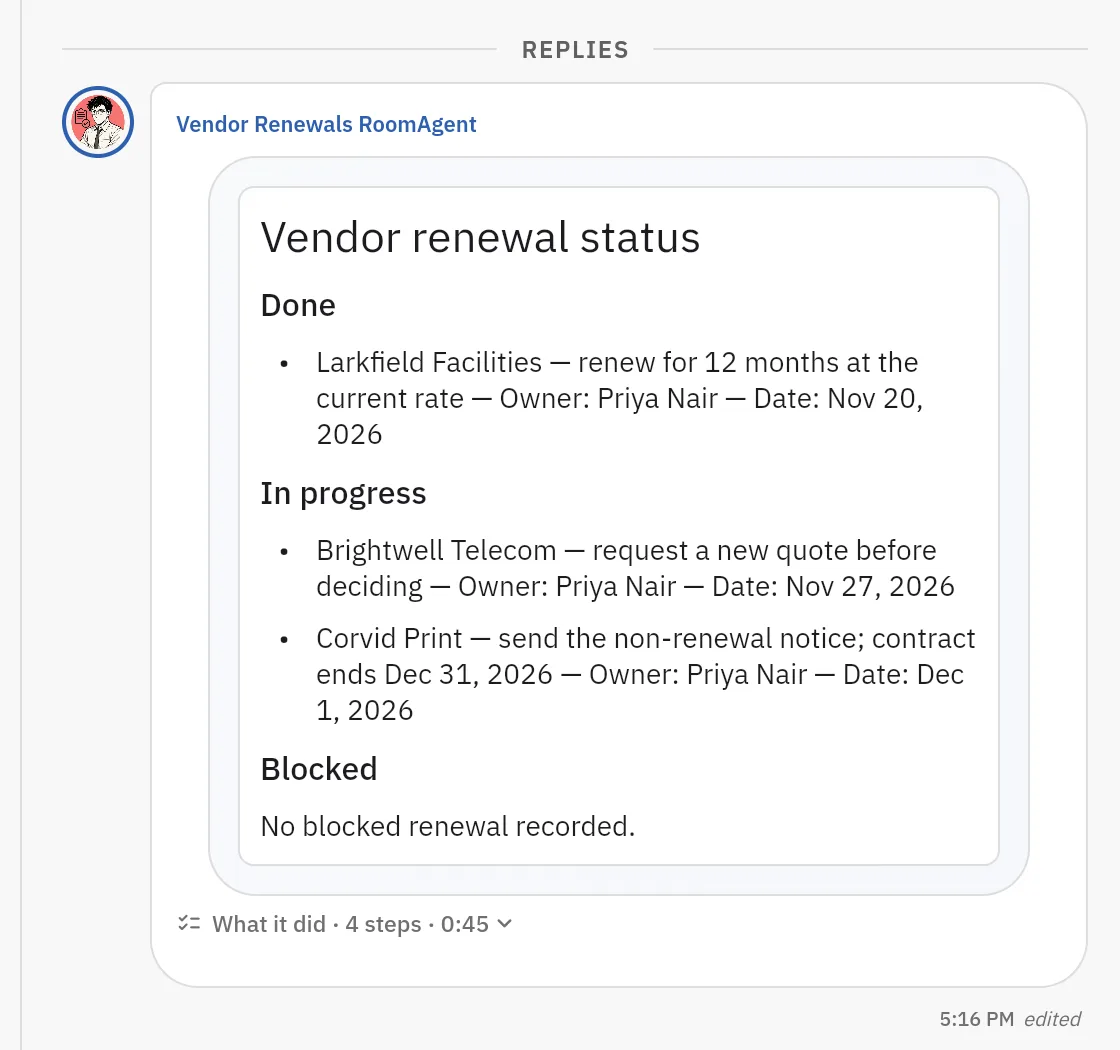
Asked for a status card, the room agent replies in the thread: one renewal under Done, two under In progress, each with an owner and a date, and no blocked renewal recorded. A person checks the names and dates.
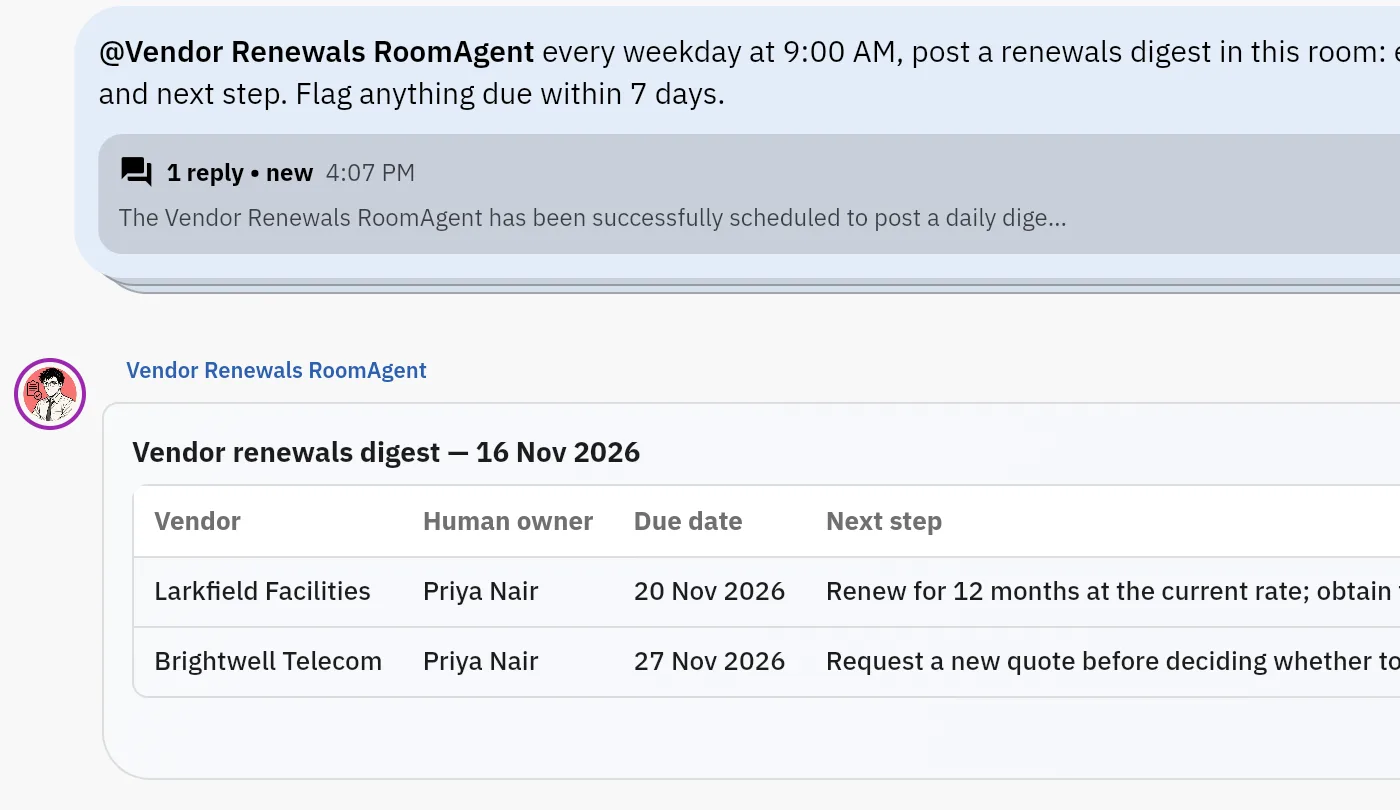
Priya asks for a renewals digest every weekday at 9:00 AM. The reply says it is scheduled, and a digest table follows: vendor, owner, due date and next step. The digest shown was started with Run now, not by the timer.
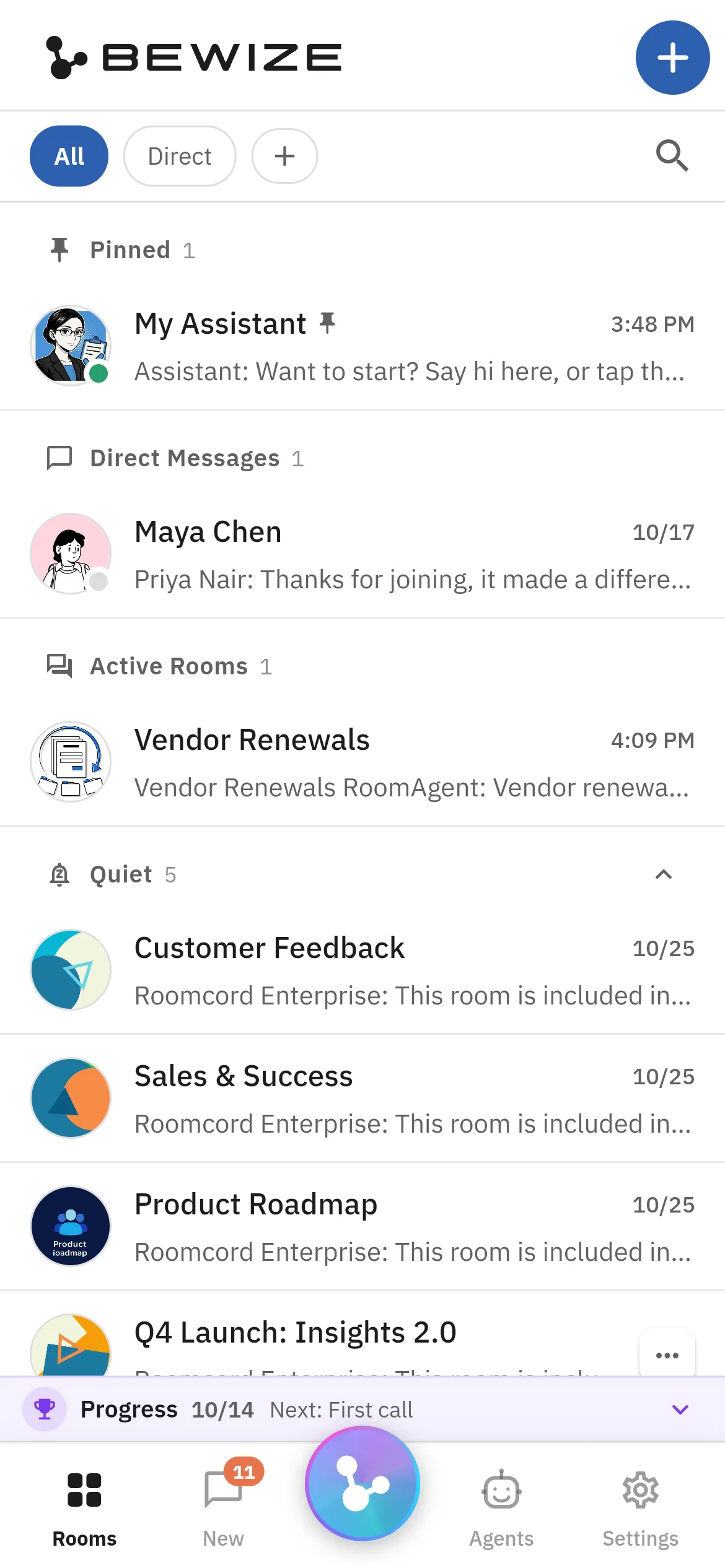
The web app at phone size: the pinned assistant, a direct message, the active room and the quiet rooms in one list.
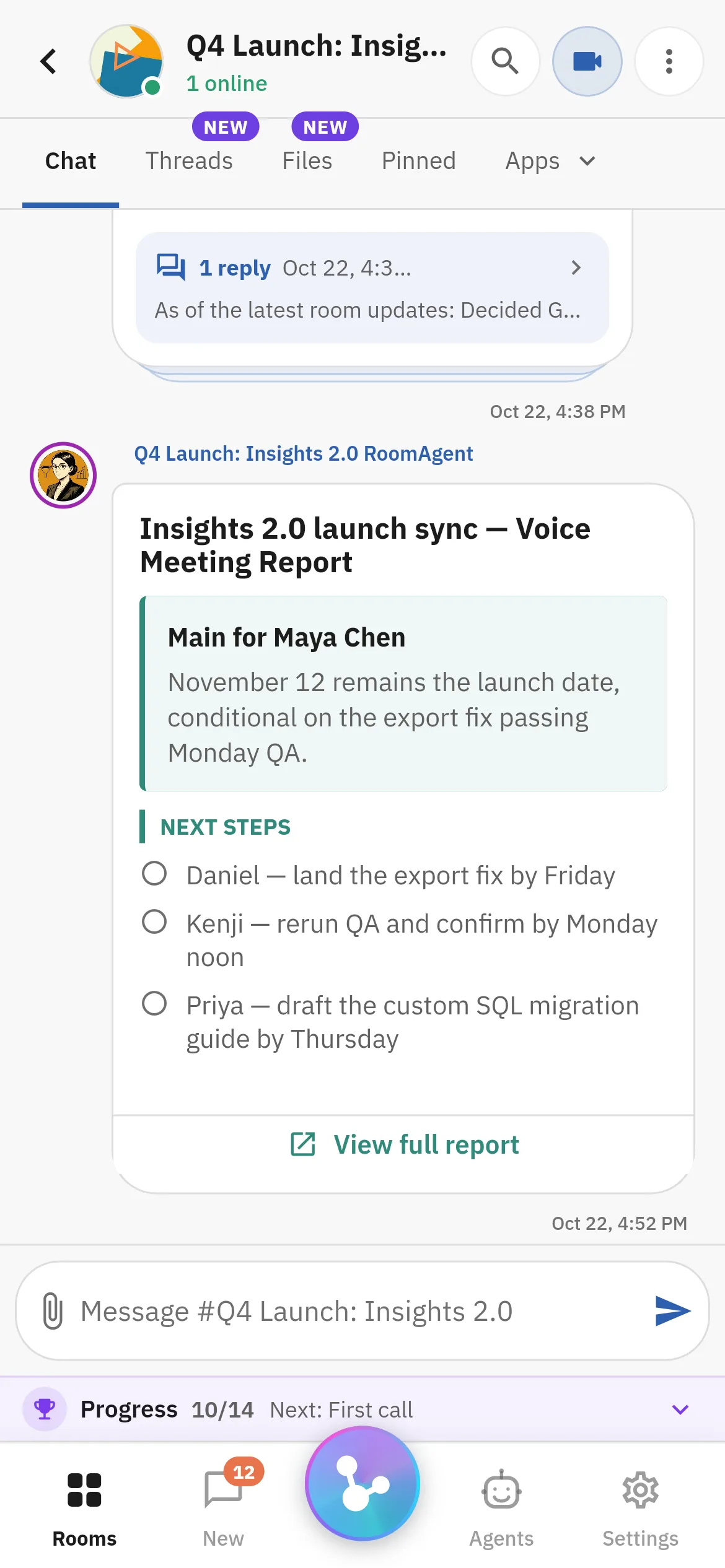
The room agent’s meeting report on a phone: the main point, three named next steps and a link to the full report.
The cost: a second app for that workflow. The test is a pilot agreed with us after a demo. Roomcord has no self-serve signup.
Pick one meeting or thread that keeps losing its follow-up. We show it in a Roomcord room: what works today, what stays manual, what is in development. Pilot scope and price follow.
Share a little context. Our team will reply by email to arrange the next step.